

How To: Increase Participant Record Limits in Relius
If a plan exceeds 10,000 participants (the default setting in Relius), participant data will not sync beyond this limit from Relius to iJoin. To ensure full data transmission, you must adjust a global setting that affects all plans.
Adjusting Global Record Limits
The values for both the “Employee list” and “Employee data” options must be increased to accommodate your largest plan sizes.
Step-by-Step Instructions
- Step 1: Log in to the Relius system.
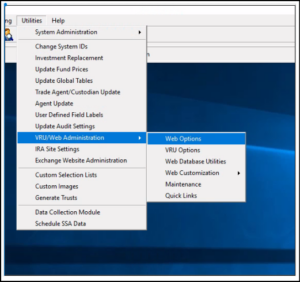
- Step 2: Navigate to Utilities > select VRU/Web Administration.
- Step 3: Click on Web Options.
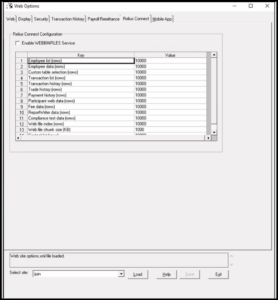
- Step 4: Within Web Options, locate:
- Row 1: Employee list (rows)
- Row 2: Employee data (rows)
- Step 5: Increase the Value column for both rows to a number larger than the participant count of your largest plan.
- Step 6: Click Save.
Tip: When increasing the record limit, choose an amount that allows for future participant growth so you don’t have to revisit this setting as your plans expand.
Next Steps
Once saved, the new limit will apply to the next scheduled Plan Sync, and data for plans exceeding 10,000 participants will begin to flow into iJoin.